
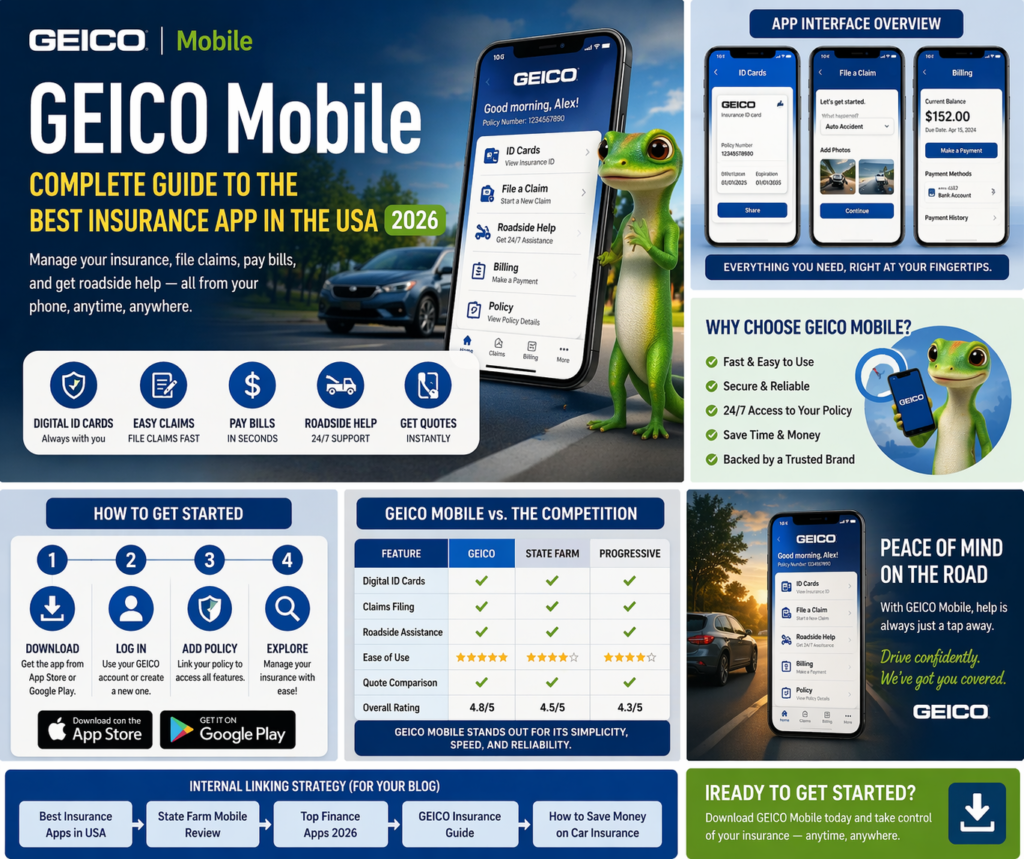
In today’s digital era, managing insurance policies has become faster, easier, and more convenient thanks to mobile applications. One of the most trusted and widely used apps in the United States is GEICO Mobile. Designed to simplify insurance management, this app allows users to handle everything from claims filing to bill payments directly from their smartphones.
Whether you are a car owner, a renter, or someone looking for a reliable insurance solution, GEICO Mobile provides a seamless experience. In this comprehensive guide, we will explore everything about the app, including its features, benefits, pros and cons, and why it stands out among competitors.
What is GEICO Mobile?
GEICO Mobile is the official app developed by GEICO, one of the largest and most reputable auto insurance providers in the United States. The app is designed to give users complete control over their insurance policies without needing to visit an office or call customer support.
Available for both Android and iOS devices, the app provides a user-friendly interface and powerful tools to manage insurance on the go. It is especially popular for auto insurance but also supports other policies like renters, homeowners, and more.
Key Features of GEICO Mobile
1. Digital Insurance ID Cards
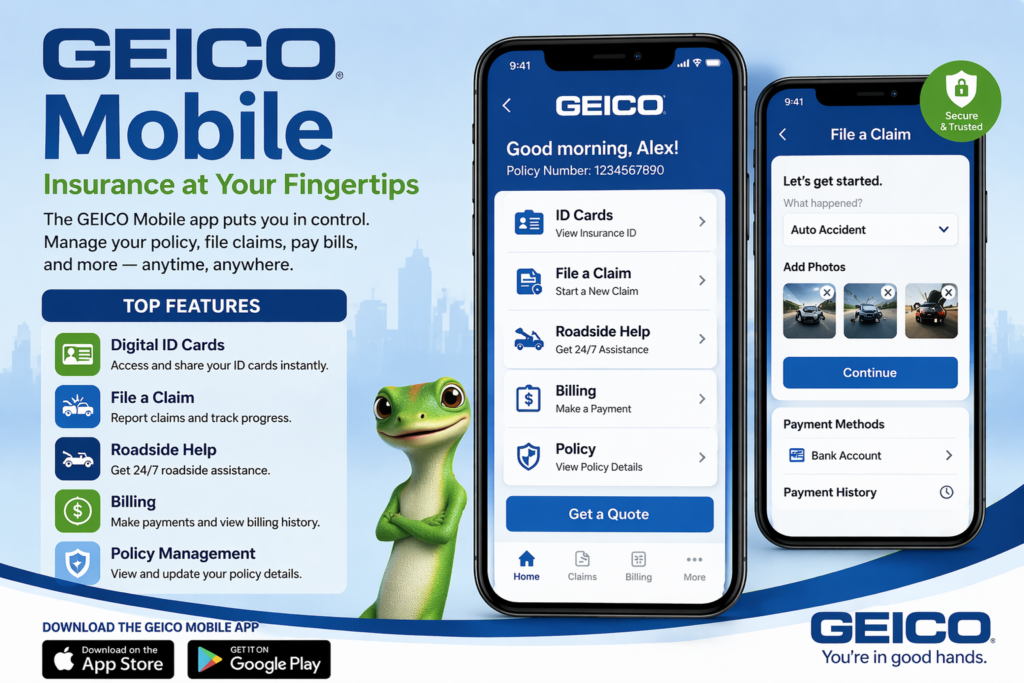
One of the most useful features of GEICO Mobile is instant access to digital insurance ID cards.
- View your ID card anytime
- Share it via email or text
- Use it during emergencies or traffic stops
This eliminates the need to carry physical documents.
2. Easy Claims Filing
Filing an insurance claim can be stressful, but GEICO Mobile simplifies the entire process.
- File claims directly from your phone
- Upload photos of damage
- Track claim status in real-time
This feature saves time and reduces hassle.
3. Bill Payments and Policy Management
Managing your insurance payments is quick and simple.
- Pay bills instantly
- Set up automatic payments
- View policy details and coverage
Users can manage multiple policies from one dashboard.
4. Roadside Assistance
GEICO Mobile provides 24/7 roadside assistance for policyholders.
- Request towing services
- Get help with flat tires or battery issues
- Track service arrival
This feature ensures peace of mind while driving.
5. Insurance Quotes and Comparison
Even non-customers can benefit from the app.
- Get instant insurance quotes
- Compare coverage options
- Customize policies
This makes it a great tool for new users.
6. Virtual Assistant
The app includes a built-in assistant to help users:
- Navigate features
- Get answers quickly
- Access support easily
Benefits of Using GEICO Mobile
1. Convenience
You can manage your insurance anytime, anywhere without visiting an office.
2. Time-Saving
Quick claims filing and instant payments save valuable time.
3. Cost Efficiency
Users can compare plans and choose affordable options.
4. Secure and Reliable
The app uses advanced security systems to protect user data.
5. User-Friendly Interface
Even beginners can easily navigate the app.
Pros and Cons of GEICO Mobile
Pros
- Easy to use
- Fast claims processing
- Digital ID access
- Reliable roadside assistance
- Trusted brand
Cons
- Limited features for non-policyholders
- Requires internet connection
- Mainly for US users
GEICO Mobile vs Other Insurance Apps
Let’s compare GEICO Mobile with other popular apps:
| Feature | GEICO Mobile | State Farm Mobile | Progressive Mobile |
|---|---|---|---|
| Claims Filing | ✔️ Easy | ✔️ Easy | ✔️ Easy |
| Digital ID Cards | ✔️ Yes | ✔️ Yes | ✔️ Yes |
| Roadside Assistance | ✔️ Yes | ✔️ Yes | ✔️ Yes |
| Ease of Use | ⭐⭐⭐⭐ | ⭐⭐⭐⭐ | ⭐⭐⭐ |
GEICO Mobile stands out due to its simplicity and speed.
How to Download GEICO Mobile
Step 1: Visit App Store
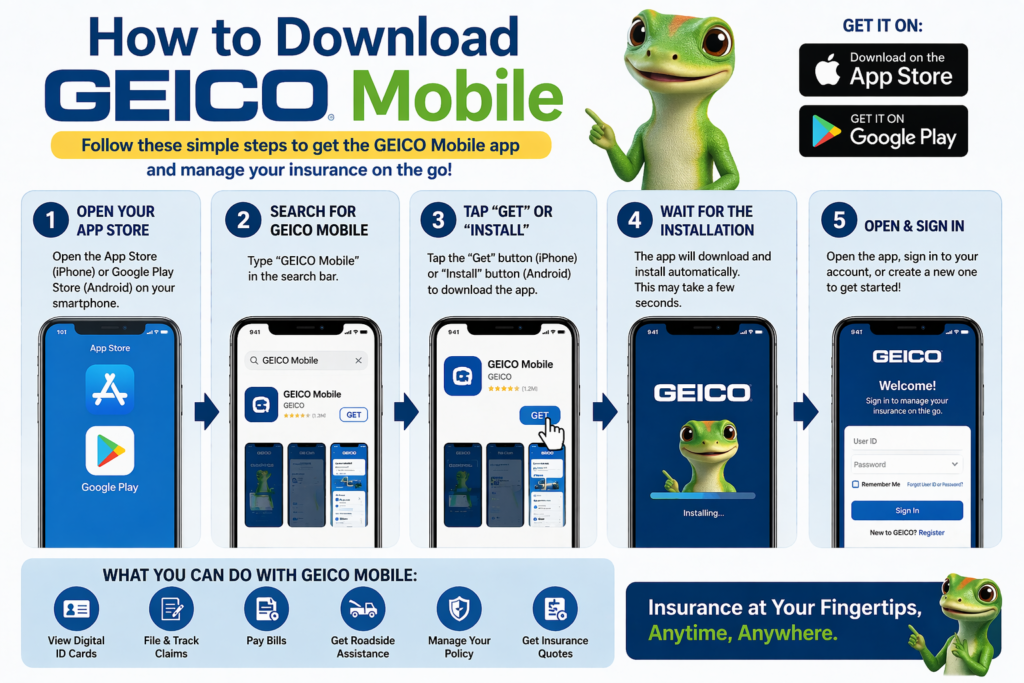
- Available on Apple App Store
- Available on Google Play Store
Step 2: Install the App
Download and install the app on your device.
Step 3: Sign Up or Log In
- Existing users: Log in
- New users: Create an account
Step 4: Add Policy
Link your insurance policy to the app.
Tips for Using GEICO Mobile Effectively
- Keep the app updated
- Enable notifications
- Use auto-pay for bills
- Save digital ID cards offline
- Contact support when needed
Security and Privacy
GEICO Mobile ensures strong data protection through:
- Encrypted connections
- Secure login systems
- Multi-factor authentication
This ensures that your personal and financial data remains safe.
Who Should Use GEICO Mobile?
This app is ideal for:
- Car owners in the USA
- People managing multiple policies
- Users who prefer mobile convenience
- Individuals looking for fast insurance services
SEO Keywords for Ranking
Use these keywords:
- GEICO Mobile app
- GEICO insurance app USA
- best insurance app USA
- car insurance apps USA
- GEICO app review
Monetization Strategy
To earn from this article:
- Add Google AdSense ads
- Use CPA affiliate links
- Add CTA buttons:
- “Get Free Quote”
- “Compare Insurance Plans”
Conclusion
GEICO Mobile is one of the best insurance apps available in the United States. It offers a powerful combination of convenience, speed, and reliability. From managing policies to filing claims and requesting roadside assistance, everything can be done in one place.
With its user-friendly interface and trusted brand reputation, GEICO Mobile continues to lead the insurance app market. Whether you are an existing policyholder or a new user, this app is a must-have for managing your insurance efficiently.
(FAQ)
Q1: What is GEICO Mobile?
A: It is a mobile app that allows users to manage insurance policies easily.
Q2: Is GEICO Mobile free?
A: Yes, it is completely free to download and use.
Q3: Can I file claims using GEICO Mobile?
A: Yes, claims can be filed and tracked directly in the app.
Q4: Is GEICO Mobile safe?
A: Yes, it uses advanced security and encryption.
Q5: Does it offer roadside assistance?
A: Yes, 24/7 roadside help is included.